How to check version of your mobile operating systems
To enhance transaction security and application efficiency as well as support new features, upcoming Bangkok Bank Mobile Banking versions will only be supported on iOS version 15.0 & above and Android version 10.0 & above from January 20, 2026 onwards
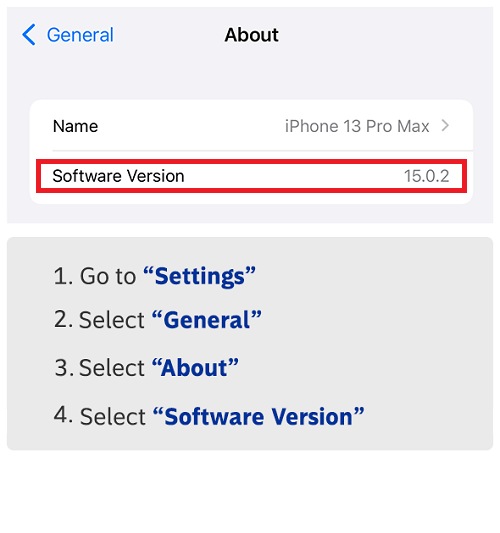
How to check software version for iOS Users
How to update software version for iOS Users
- Go to “Settings” and select “General”
- Select “Software Update”
- Select “Update Now”
- Select “Install Now” or select “Download and Install”
- Enter your mobile passcode, then select “Install Now”
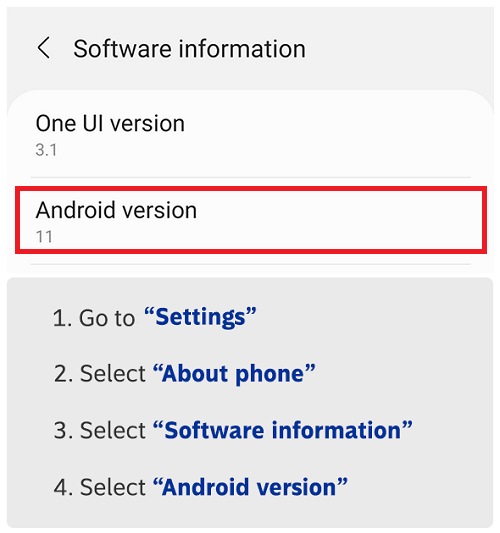
How to check software version for Android Users
How to update software version for Android Users
- Go to “Settings”
- Select “About phone” (or “Software update” / “System update”)
- Select “System update”
- Select “Check for update”
- If a new software update is available, select “Download and install”

TOOLS & ASSISTANCE


