Why is the internet banking service being discontinued?
We have decided to discontinue Bualuang iBanking as it limits our ability to add and expand new services and to enhance security.
We kindly encourage you to switch to using our mobile banking service – the Bangkok Bank Mobile Banking application, which offers a more comprehensive level of security. With Bangkok Bank Mobile Banking app, you can conveniently, quickly, and safely manage your financial transactions anytime, anywhere. The app is designed to make your banking experience easier with helpful features, such as QR Code payments, cardless ATM withdrawals, scheduled transfer and lock/unlock account.
If you need help getting started with Bangkok Bank Mobile Banking, please visit your nearest branch or call the Bangkok Bank Call Center 1333.
When will this happen?
From December 15, 2026, you will no longer be able to access Bualuang iBanking and we encourage you to switch to Bangkok Bank Mobile Banking before this date to ensure your transactions are smooth and uninterrupted.
If you have any questions or need assistance, please visit your nearest branch or call the Bangkok Bank Call Center 1333.
If I cancel my internet banking, what do I need to do to continue accessing my account?
If you are a Thai citizen - please download the Bangkok Bank Mobile Banking application from the App Store or Play Store. Once the download has been completed, select ‘Get started’ and follow on-screen instructions.
If you are a foreign customer please visit your nearest branch, taking with you your bank book and your passport. Our staff can help you get started on mobile banking and will also ask you to take a photo for facial recognition and confirm your current phone number.
View more information about screen flow on how to set up a mobile banking account for Android and Apple phone.
If I don’t have a Thai Citizen ID how can I set up my account on the mobile banking app?
If you don’t have a Thai Citizen ID you will need to go to a branch to set up your account. Please bring your bank book and your passport as identification and also register for facial recognition with a photo taken in the branch at the same time. View more information about foreigners applying for mobile banking at the branch.
Will the functions available on internet banking be available on the mobile banking app?
Services on internet banking are still available with even more services on Bangkok Bank Mobile Banking.
There are daily limits on transfers with mobile banking, are these the same limits as for my internet banking?
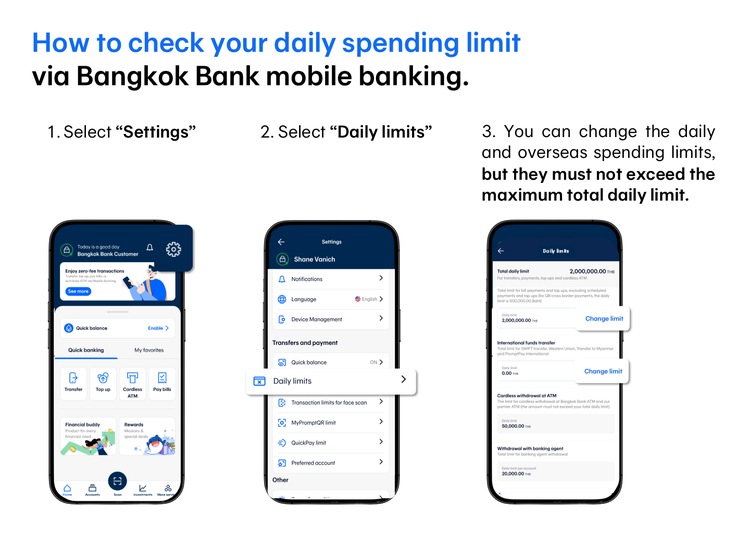
Yes, they are the same. If you are new to Bangkok Bank Mobile Banking app there will be a varied pre-set daily limit given to you depending on the Bank’s consideration as follows:
- Customers aged between 15 to 18 years will receive an initial daily transaction limit of 10,000 baht
- Customers aged between 18 to 20 years will receive an initial daily transaction limit of 20,000 baht
- Customers aged 20 years and over will receive an initial daily transaction limit of 30,000 – 50,000 baht
This does not include the cardless ATM withdrawal limit of 50,000 baht per day, or the withdrawal at a Banking Agent limit of 20,000 baht per day. You can easily check your daily limits on the Bangkok Bank Mobile Banking app by going to “Settings” and selecting “Daily limits.”
Will information – eg 3rd party account numbers and international transfer information that I added on internet banking be automatically transferred to mobile banking.
No, information will not automatically transfer, you will need to add it on Bangkok Bank Mobile Banking. However, when you complete your transfer to a 3rd party account you can save it as a favorite right away which will make it easy to make future transfers.
View more information about how to add favorite.
For international transfers, the 3rd party accounts registered in Bualuang iBanking will be automatically transferred to the Bangkok Bank Mobile Banking.
What happens to my scheduled payments and transfers that I have set up on internet banking?
Scheduled transactions set to take effect on Bualuang iBanking from December 15, 2026 onwards will be automatically canceled. You can check your scheduled transactions on the “Transfers scheduled for future dates” menu. To prevent scheduled transfers or payments from being missed we recommend that you prepare in advance by scheduling them on Bangkok Bank Mobile Banking.
Note: If you have registered for Bualuang Direct Debit Service via Bualuang iBanking the payments will continue as usual.
How do I set up a scheduled transfer with Bangkok Bank Mobile Banking?
Open the app, go to “Transfer” menu and fill in recipient account, then below the amount you will see “Create a schedule” on the drop down menu. Select “Create a schedule” and follow the on-screen instructions. View more information about screen flow on how to set up a schedule transfer.
On internet banking, an OTP is sent to my phone when I add the 3rd party account for payment then another one for the first transfer – will this be the same with mobile banking app?
On Bangkok Bank Mobile Banking you can add 3rd party accounts in “My favorites” menu on the Home Screen right away.
Isn’t this less secure?
Our Bangkok Bank Mobile Banking app has a very high level of security. You need to log in with a PIN or fingerprint or facial recognition. If you are transferring, paying or topping up more than 50,000 baht per transaction (or as set by the customer), and for cumulative daily transactions of 200,000 baht, the app will require your facial recognition to ensure security and prevent fraudulent activities.
I have regular payments that I have to make even though I no longer have internet banking, what options do I have?
If your payments are regular you can register for Bualuang Direct Debit Service via Bualuang iBanking before the service is discontinued and the payments will continue as usual or you can register for Bualuang Direct Debit Service with Bangkok Bank Mobile Banking as well.
View more information about register for Bualuang Direct Debit service on Bangkok Bank Mobile Banking
I am overseas and I don’t have mobile banking, only internet banking. How can I continue doing my banking online?
You can continue using Bualuang iBanking up until December 14, 2026 (Thailand time). After that you will need to use Bangkok Bank Mobile Banking. However, you can still check your account balance and transactions by calling Bangkok Bank Call Center +662645 5555. Please have either your debit card or your registered telephone number (capable of receiving an OTP from the Bank) ready for verification purposes.
What other options do I have to transfer money within Thailand if I am overseas and have a Bangkok Bank account and don’t have mobile banking?
If you have a bank account in your country of current residence, you can make international funds transfer to Thailand. You will need to give the Bangkok Bank account number and name of the recipient and the SWIFT code which is BKKBTHBK.
You can also use the Western Union service and the recipient can receive the money through Bangkok Bank Mobile Banking or at a branch.
You can find more information about Transferring Into Thailand (for sender and recipient) Receive money from Western Union via Mobile Banking (for recipient)
I do not have a compatible Apple or Android smartphone. What are my options?
For security reasons devices used to access Bangkok Bank Mobile Banking service must comply with supported operating systems. If you wish to use our service, please upgrade your phone to meet these operating and security standards.
If you need help getting started with Bangkok Bank Mobile Banking, please visit your nearest branch or call the Bangkok Bank Call Center 1333.