Online mobile top up with ease
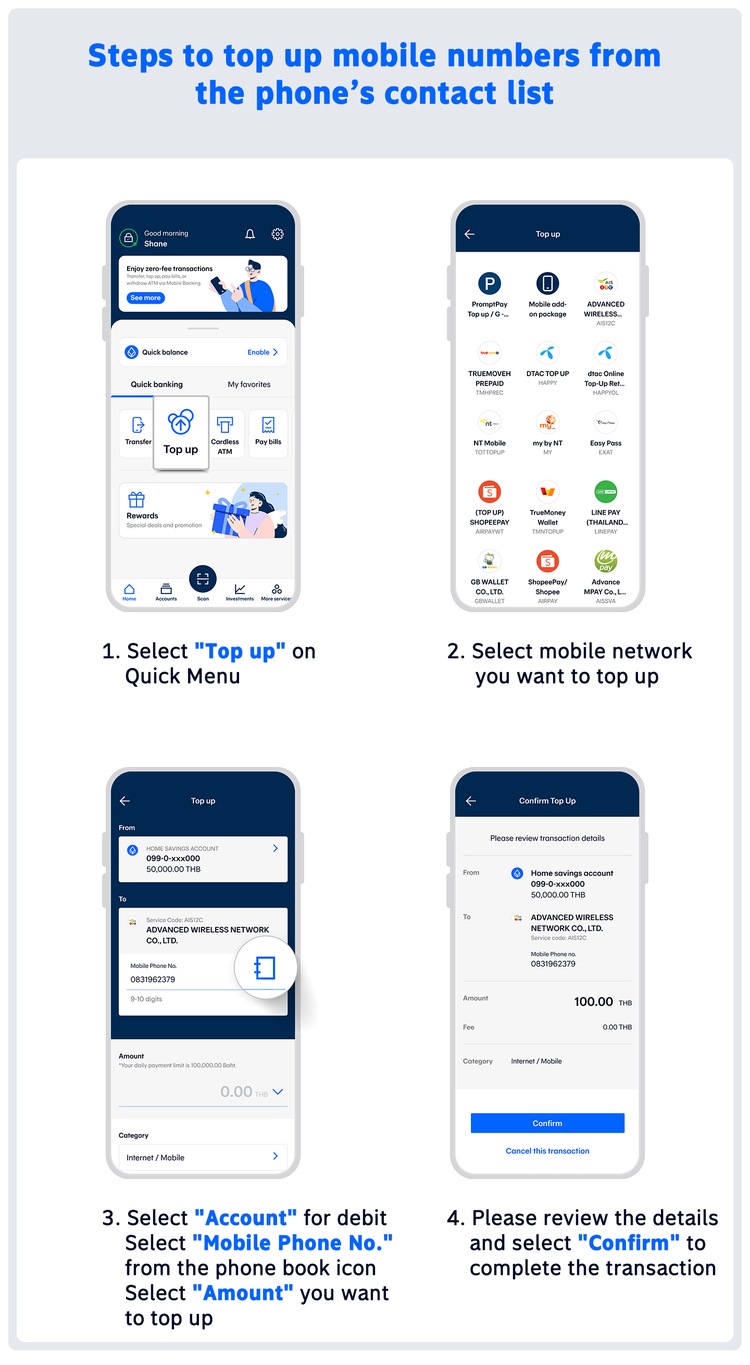
Choose a mobile number from your phone contacts
When it comes to mobile top-ups, users sometimes enter the wrong mobile number and top up the wrong one. If this happens, they have to contact the mobile network's customer service to request a refund which is time consuming. Sometimes customers need to switch between apps to copy phone numbers from the contact list to the input field in the mobile banking app which is irritating.
Today, topping up can be easy, convenient and fast via Bangkok Bank Mobile Banking app. Using the mobile top-up feature, users can select a phone number directly from their contact list without manually entering the mbile onumber reducing the risk of input errors. This means you can top up at ease, whether for your family members, friends, or others.
Is there a fee for topping up mobile phones via Bangkok Bank Mobile Banking app?
- Topping up mobile phones via Bangkok Bank Mobile Banking app is free for all networks. No additional fees.
Which mobile network is available to top up by selecting a number from the phone's contact list?
- AIS
- TRUE
- DTAC Top Up (Prepaid)
- dtac Online Top-Up (Retailer)
- NT Mobile
- my by NT
If you top up the wrong mobile number, what should you do?
- Contact the customer service of the mobile network that the mistakenly topped-up number belongs to.
- Follow the instructions from the customer service to receive a refund to the correct mobile number.
What could be the reasons why mobile top-ups fail?
- It could be that the phone number selected for the top-up and the mobile network do not match.
Besides mobile top-up services, what other top-up services are available?
- G-Wallet
- Easy Pass
- ShopeePay
- TrueMoney Wallet
- LINE Pay
- GB Wallet
- AirPay
- mPAY
- SCB M Prepaid Card
- KERRY Wallet
- WiPay
- Sabuy Money
Recommended Features
Enhance your online banking experience with Bangkok Bank Mobile Banking