No Card – No Problem, View Your Credit Card Information via Bangkok Bank Mobile Banking
Shop online conveniently anytime, anywhere without having to remember and type your credit card number. View your credit card number, security code (CVV), and other card information through Bangkok Bank Mobile Banking. It's safe, with no need to write down all the details, or carry your card.
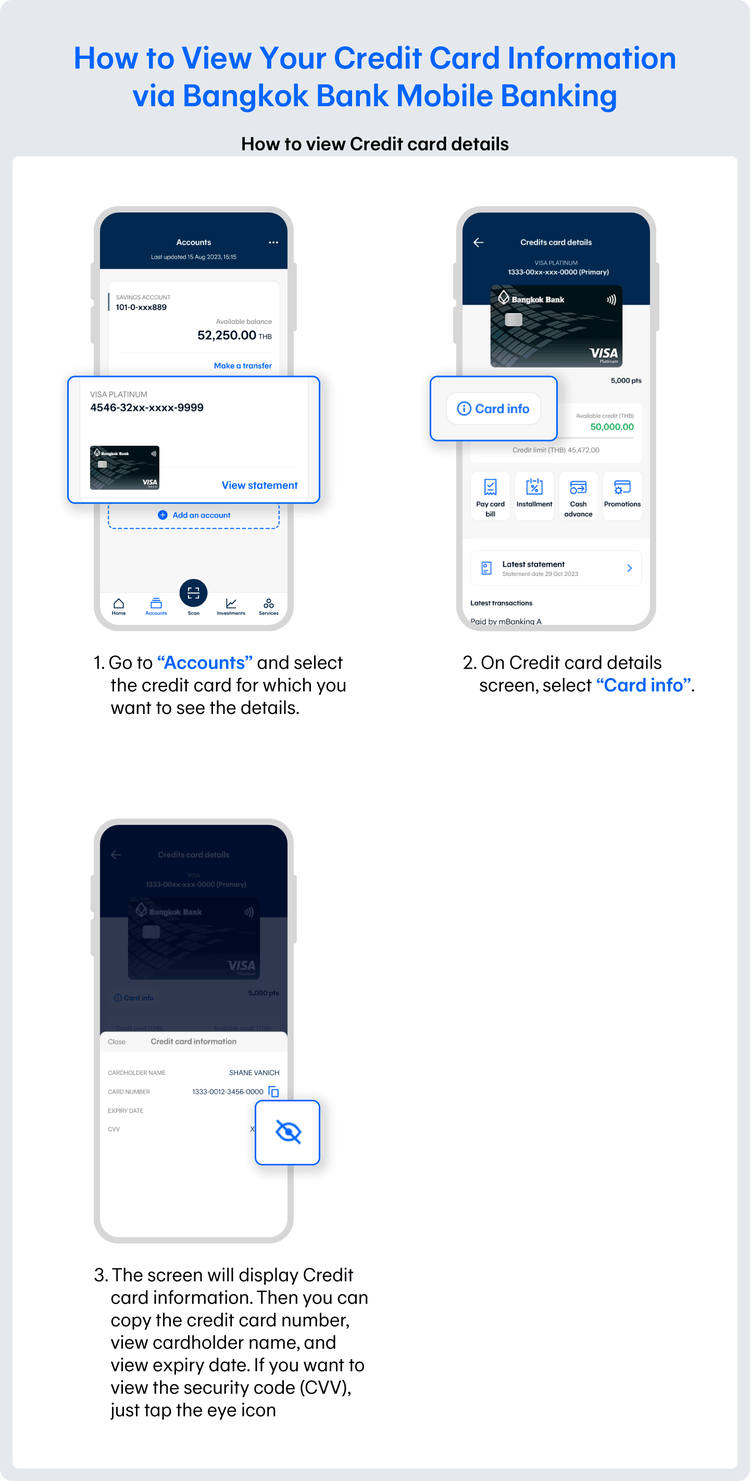
Credit card information you can view through Bangkok Bank Mobile Banking:
- Cardholder's name
- Card number
- Expiry date
- Security code (CVV)
How to use the view credit card information feature via Bangkok Bank Mobile Banking:
If you’re shopping online, you can easily copy your credit card number from credit card details screen in the Bangkok Bank Mobile Banking app and paste it into an online shopping app or website’s checkout forms—noneed to type it manually or reach for your physical card. This is not only very convenient, but it also helps reduce errors and saves your time when entering your payment information.
Remember to pay back in full by the due date, so you will not incur the 16% interest charge.
Recommended Features
Enhance your online banking experience with Bangkok Bank Mobile Banking